Gemini 3 pro Review: A Creative Powerhouse with Real Limits
YouWare DailyNovember 25, 2025
6 mins read
For the last six months, the tech world has been unsure whether Gemini 3 pro would be Google’s “PlayStation 2 moment” (a breakthrough) or their “Atari 2600 moment” (a nostalgic flop). After running extensive tests, the answer is… complicated.
Gemini 3 pro has remarkable creative strengths—and equally noticeable boundaries. This review is about understanding both dimensions.
1. The Hype Train
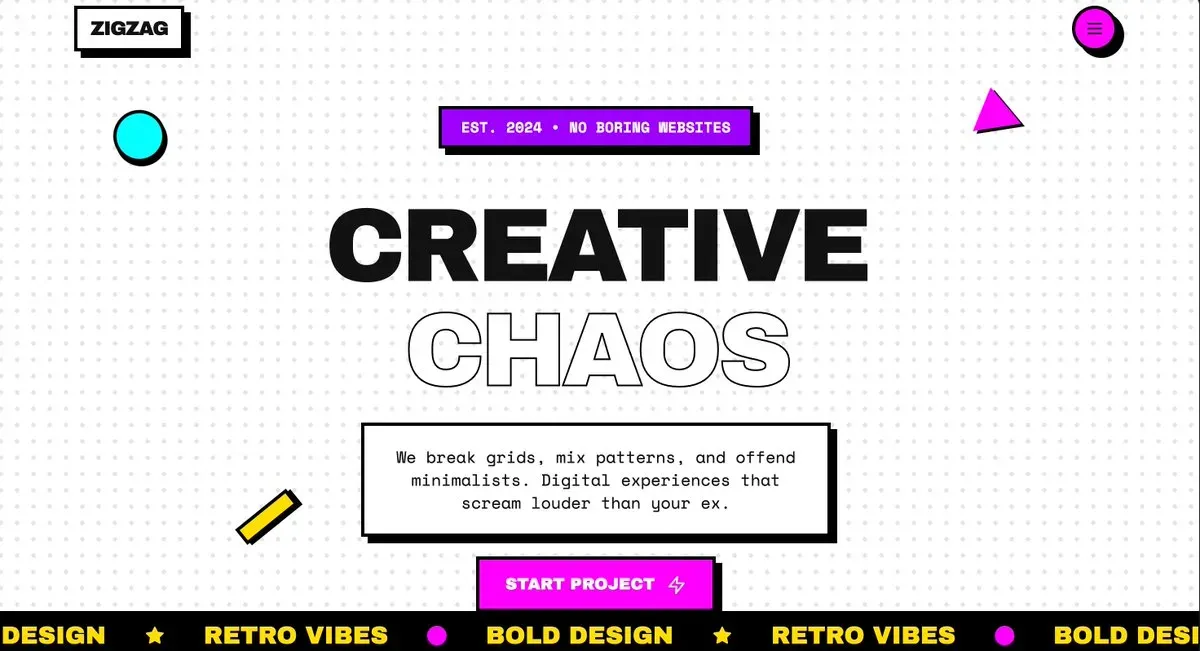
A few days ago, Google quietly routed part of the mobile app traffic to Gemini 3 pro. Our team’s reaction was immediate: for the first time, we saw an AI that appeared to have aesthetic taste.
We tried this prompt:
The Prompt: "Make a neobrutalist webpage, make it extremely creative, as far as possible, push the limits. Add smooth scroll animations, add fancy colors and tailwind css styles. Make it responsive.
The result was shockingly modern—far beyond the usual “2005-template-with-gradients” output common in many of the other models. The structure was clean, the visual style intentional, and even the small touches (like the “Initialize Chaos” button) hinted at personality.
We were ready to be impressed.
Gemini, however, had a very different dimension we would soon discover.
2. Creative Powerhouse, Structured Limitations
When the API went live, we immediately started a deep-dive evaluation. After dozens of tests, a clear pattern emerged:
Disclaimer: Many developers argue this pattern actually indicates improved model intelligence. When a model is given extensive context and constraints, the model prioritizes following instructions over creative exploration. With minimal prompts, it has more freedom to generate innovative solutions.
This pattern becomes a real challenge when evaluating the model. Most AI coding benchmarks ask for solving bugs or drawing strange objects—none of which map to real engineering work. Developers aren’t drawing pelicans on bicycles; they’re building products. Their real prompts might look like this:
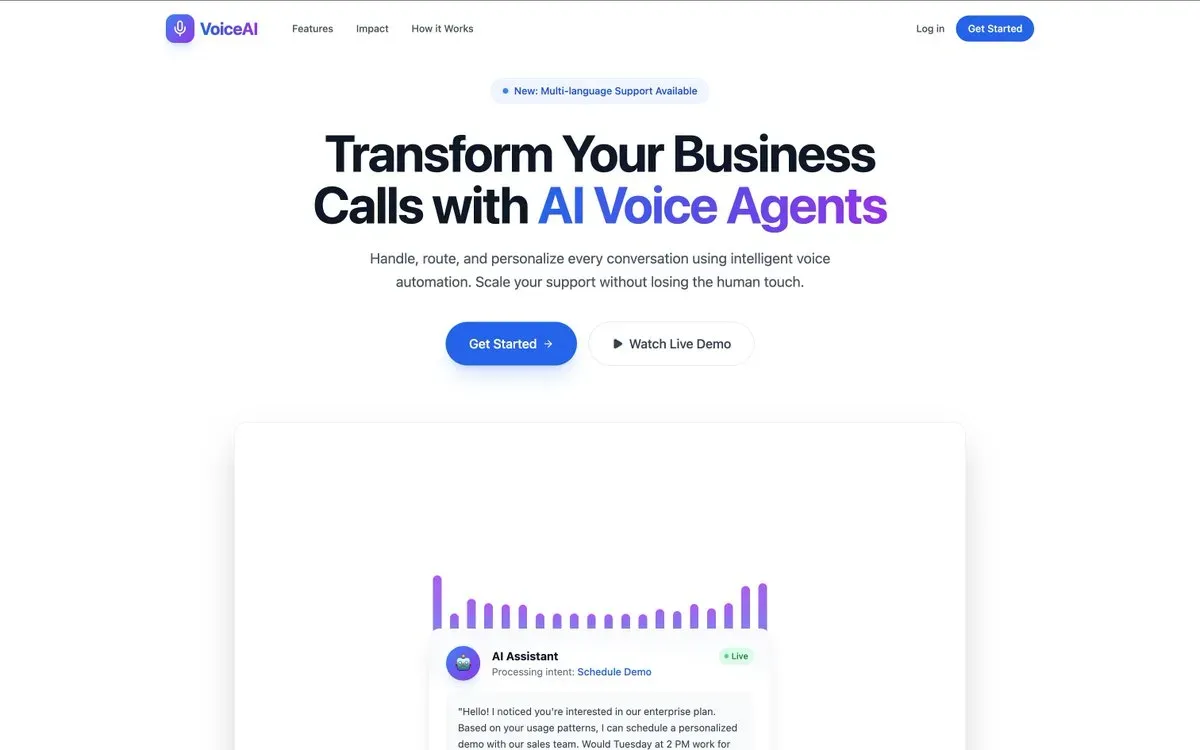
Goal: Design a modern, visually appealing, and conversion-optimized website for an AI-powered voice agent platform that automates and personalizes business calls. The platform should look cutting-edge, professional, and trustworthy—ideal for tech-savvy startups and enterprise clients.
🔥 1. Landing (Hero) Section Headline: “Transform Your Business Calls with AI Voice Agents”
Sub-headline: “Handle, route, and personalize every conversation using intelligent voice automation.”
Two bold buttons: [Get Started] and [Watch Live Demo].
Visual ideas: Animated voice waves or glowing AI assistant avatar. Gradient backgrounds with soft, animated elements...
(And another 5 blocks)
So we tested Gemini using our internal YouWare Benchmark, which consists of hundreds of real user prompts—functional requirements, product briefs, and UI definitions.
This benchmark lets us evaluate Gemini according to conditions that matter, like can it build software? Can it follow constraints? Can it stay consistent?
3. The "Boring" Benchmark
And this is where the ‘real limits’ part of the title comes in. When tested against structured, real-world tasks, Gemini became far less groundbreaking.
When fed real enterprise requirements—the kind developers deal with 90% of the time—Gemini stopped behaving like an experimental artist and became much more conservative.
For the same landing-page prompt mentioned earlier, Gemini produced a completely functional website. But visually, it shifted into a safer, more generic aesthetic. The bold expressiveness faded, replaced with a template-like feel (It even looks like Sonnet 4.5.)
To evaluate fairly, we ran all outputs through our internal LLM Judge, which simulates a user evaluating:
visual clarity
requirement adherence
overall usability
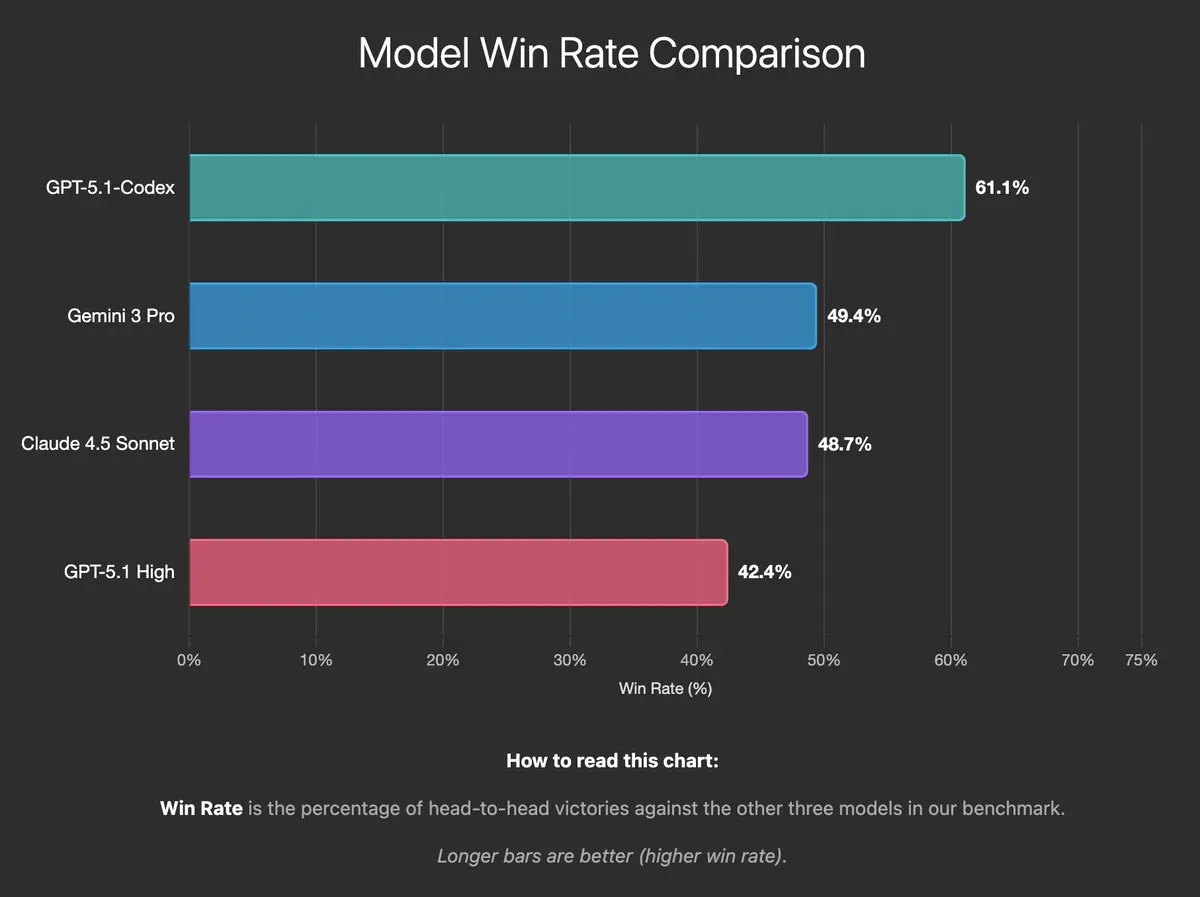
What “Win Rate” Actually Means
Win Rate = the percentage of benchmark prompts where one model’s output is judged better than another’s in a head-to-head comparison.
This is not a universal ranking—it's a controlled evaluation inside our system.
High-level results
Note: The numbers below come from internal YouWare Benchmark runs conducted in November 2025.
GPT-5.1 Codex: 61.1% win rate
Gemini 3 pro: 49.4% win rate
Claude 4.5: 48.7% win rate
GPT-5.1: 42.4% win rate
Codex still delivers more consistent, polished results. But Gemini remains competitive—and its strengths show up elsewhere.
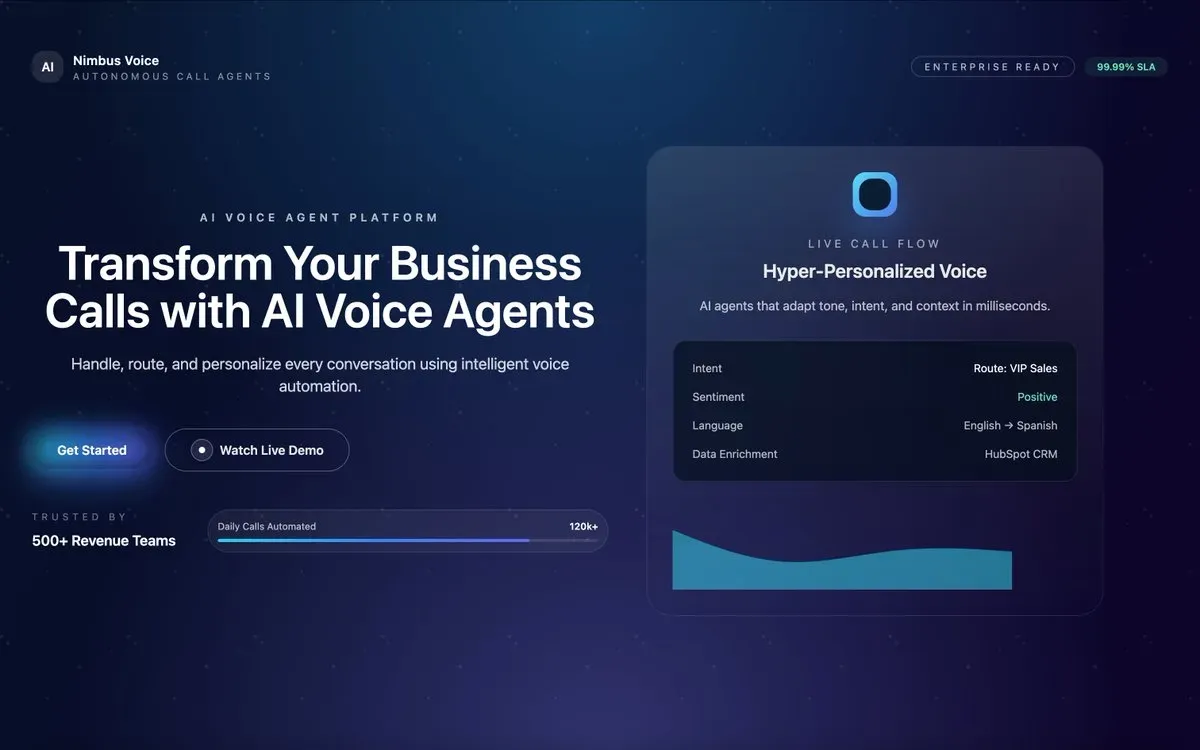
To illustrate, here is how Codex interpreted the same landing-page prompt: a sleek dark mode design with live dashboard components and premium styling.
4. Efficiency: Where Gemini Shines
While Gemini can lose on polish and consistency, its efficiency tells a very different story.
**
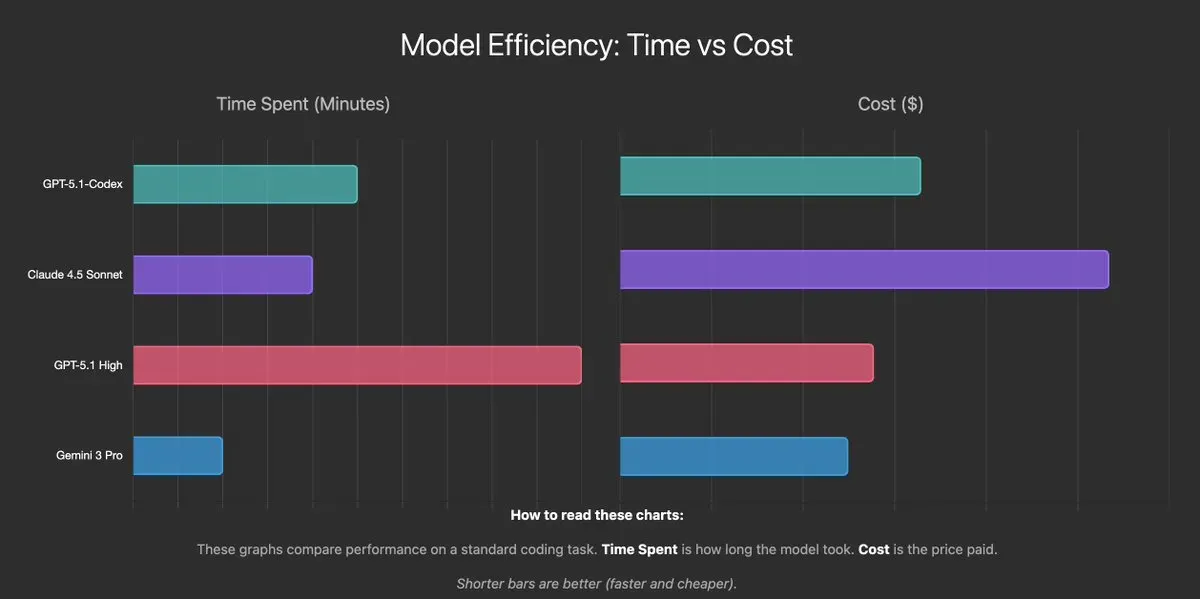
Model Efficiency: Time vs Price**
Data Note: The chart reflects YouWare’s internal measurements of average generation latency and per-request cost based on each provider’s listed API pricing at the time of testing.
Even with its limitations, Gemini compensates with exceptional speed and cost efficiency.
Latency: Gemini 3 pro generated functional code outputs noticeably faster than Codex in our tests.
Cost: Based on published pricing, Gemini 3 pro’s per-token cost is significantly lower than Codex and Claude.
This makes efficiency the area where Gemini becomes a true powerhouse. Even if it doesn’t always produce the most refined output, it generates usable results quickly and cheaply — a major advantage in large-scale generation environments.
5. The "Van Gogh" Effect
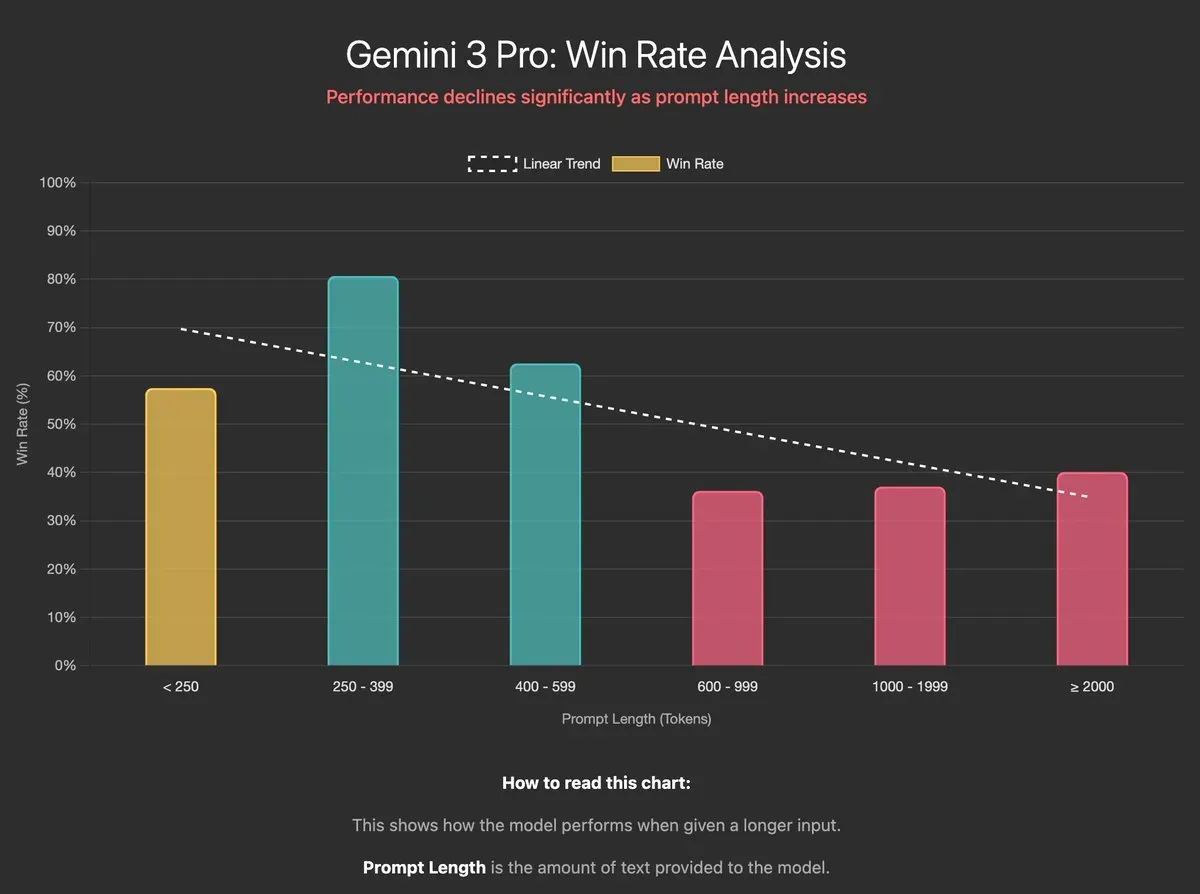
When we plotted performance against prompt length, a striking pattern emerged:
250–399 tokens → performance peaks around 80%
600+ tokens → performance crashes into the 30% range
This reflects a core truth about Gemini:
It thrives when given creative freedom—and struggles under heavy micromanagement.
Gemini wants conceptual direction, not step-by-step constraints. Treat it like a creative collaborator, and it excels. Treat it like a deterministic engine, and results fall short.
6. What This Means for Developers
So, is Gemini 3 pro simply a moody artist?
Not exactly.
Now that the model has been released, the next challenge lies with the application layer—tools like YouWare that help guide Gemini into reliable, production-ready behavior. And we've already started building our plan to get the most from this model.
Our Roadmap
Rethinking the Prompting Manual
We’re redesigning our prompting patterns to reduce over-specification and allow structured creativity without sacrificing control.
Embracing Conversational Coding
Gemini’s improvisational strengths suggest it may perform better in multi-turn dialogue. We’re expanding our benchmark suite to test this.
Model Ensemble = Coordinated Roles
Different models excel at different tasks. We’re integrating Gemini into a broader ensemble with generative creativity from Gemini, constraint enforcement, and structure from other models.
Fun Observations From Testing
Gemini has aesthetic preferences: Give it the same prompt for an 80s Memphis-style site—it still often returns a brutalist design. There’s a personality in there. Looks familiar, right? ⤵️
Our “Boost” feature works surprisingly well: Acceleration parameters seem to amplify Gemini’s strengths more than strict instruction tuning does.
Gemini 3 pro isn’t the all-purpose breakthrough many hoped for—but it is something real: a wildly creative model with sharp edges you can’t ignore. Give it freedom and it dazzles; box it in and it stumbles. And that’s the game now. The future isn’t about finding a perfect model—it’s about knowing how to use each one where it shines. Gemini 3 pro shines brightly. Just don’t ask it to color inside the lines.
Gemini 3 Pro Review: Creative Powerhouse with Real Limits