You Don't Need to Know How to Code. You Need to Know What You Want.
Here's a moment every first-time vibe coder has hit.
You type your idea into the prompt. Something like: "Build me a habit tracker with streaks and a clean dark mode UI." You hit generate. And then, poof it actually works. There it is. A real, running habit tracker app. And then you think: why haven't we had this technology for the last 20 years?
That feeling isn't confusion. It's the gap closing between having an idea and having a tangible output. Vibe coding collapses that gap. But to get the most out of it, there's a workflow worth learning. Not because it's complicated, but because a little structure turns good outputs into great ones.
Here's how we think about it at YouWare.
1. Start with the vibe, not the spec
The instinct most people have is to over-engineer their first prompt. They want to write a perfect brief. Don't. Start with the feeling of what you're building. A portfolio that feels like a late-night magazine. A booking tool that's fast and doesn't ask for anything unnecessary. A game that's dumb and fun and takes 90 seconds to play.
That description, the vibe, is actually more useful than a feature list. The AI is going to make hundreds of small decisions while building your project. A strong creative direction guides those decisions better than a spec does.
Once you have a first version, then you get specific.
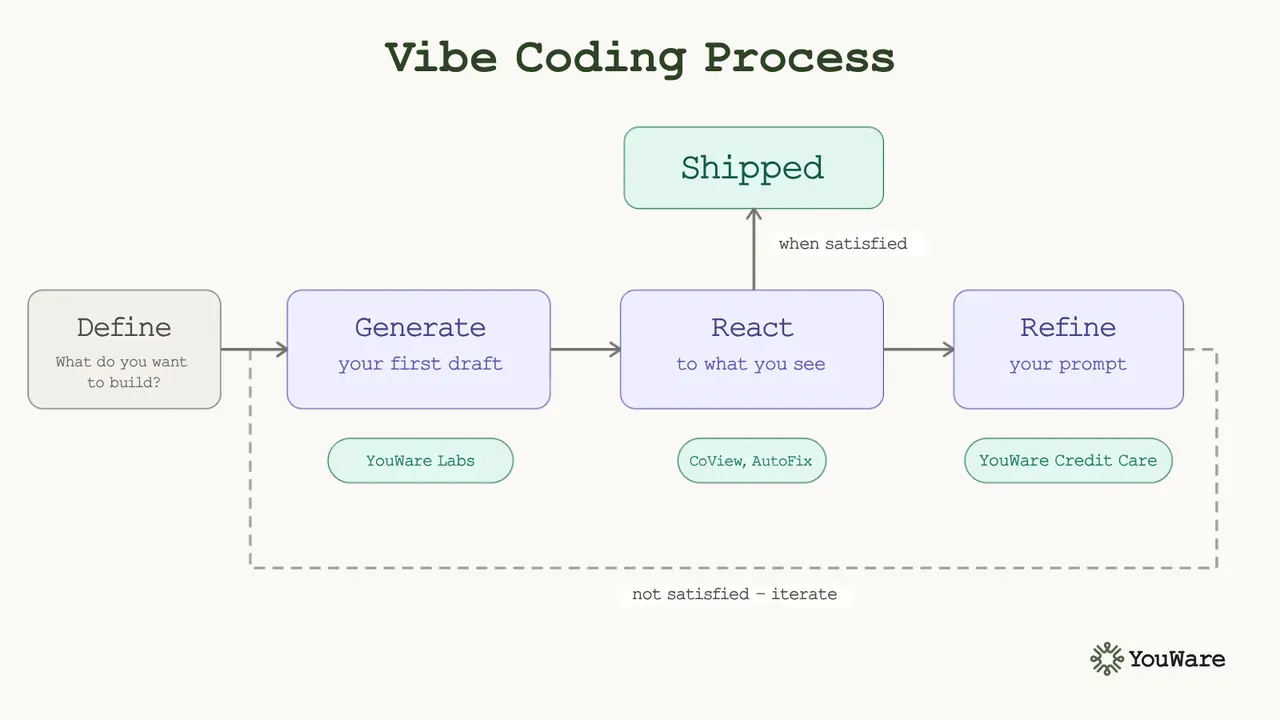
2. The loop: generate, react, refine
Vibe coding isn't a one-shot process. It's a conversation. Here's the basic rhythm:
- Generate a first draft. Don't overthink the initial prompt. Get something on screen.
- React to what you see. What's working? What's off? Don't try to fix everything at once — pick the one thing that bothers you most.
- Prompt the fix. Be specific about what you want changed. "Make the header smaller" is fine. "Make the header smaller and move the nav links to the right" is better. "The header feels too heavy — reduce font size to something closer to 18px and give the nav more breathing room" is best.
- Repeat.
Most good projects on YouWare go through 5-10 iterations before they're done. That's not a sign something's wrong, that's actually the process working.
3. Use what you can see
One of the fastest ways to close the gap between what you have and what you want is to show the AI exactly what the problem is instead of describing it.
Before you start a project, a quick sketch helps. Write down the four things: what it is, who it's for, what it does, and how it should feel. The more specific you are on each, the less the AI has to guess. "A timer app" gives you a box with numbers. "A Pomodoro timer for deep work sessions, minimal and calm, countdown in a large serif font, gentle sound when it finishes, muted beige and grey palette" gives you something you'd actually want to use.
YouWare's CoView feature lets you record your screen and narrate what you're seeing. "This button is overlapping the footer on mobile, see here..." is faster than writing three paragraphs about a layout bug. If you're on mobile, take a photo of a whiteboard sketch or a paper prototype and turn that into a starting point.
Describe, yes. But show when you can.
4. Know when to use YouDraft
For bigger projects (anything with multiple pages, a backend, user accounts), it's worth starting in YouWare Labs' YouDraft before you build.
YouDraft lets you wireframe the structure of your project before any code gets generated. Think of it as sketching the blueprint before the house. You're not writing code. You're making decisions: what does this need to do, what are the main screens, how does the data flow?
Five minutes in YouDraft can save you from rebuilding your project three times.
5. Boost is not a finishing touch
A lot of people use Boost at the end of a project to clean things up. That works. But Boost — YouWare's one-click visual quality upgrade — is also useful mid-build, especially if you're stuck.
Sometimes a project that looks rough just needs the visual layer cleaned up to make it easier to see what else needs work. Run Boost earlier than you think you need to.
6. Save yourself with YouWare Credit Care
You tried something. It went sideways. The latest version is worse than the old one.
YouWare Credit Care lets you reverse that change and recover the credits you spent on it. Use it freely. The worst thing you can do in a vibe coding session is keep building on top of a version you don't like because you feel like you can't go back.
You can always go back.
The thing nobody tells you
The skill that separates good vibe coders from great ones isn't prompt writing. It's clarity about what they actually want.
The more specifically you can describe the thing in your head (the feel of it, the function of it, the small details that would make it right), the better the output. AI can build almost anything. The bottleneck is almost always the idea.
So spend the extra minute before you prompt. Know what you're going for. Everything else follows that.