How to Build Your First AI Agent with GLM-5: A Beginner's Guide

TL;DR
GLM-5, Zhipu AI's latest flagship model released on February 11, 2026, represents a paradigm shift from "writing code" to "writing engineering systems." With 744B total parameters (40B active via MoE architecture), a 200K context window, and groundbreaking performance on agentic benchmarks—including 77.8% on SWE-bench Verified and 62.0% on BrowseComp—GLM-5 is purpose-built for Agentic Engineering. At roughly 15-23x cheaper than Claude Opus 4.5, it's the ideal open-source model for beginners to build their first AI agent. For those who prefer a no-code approach, YouWare offers an accessible path to experience agent-like capabilities without writing a single line of code.
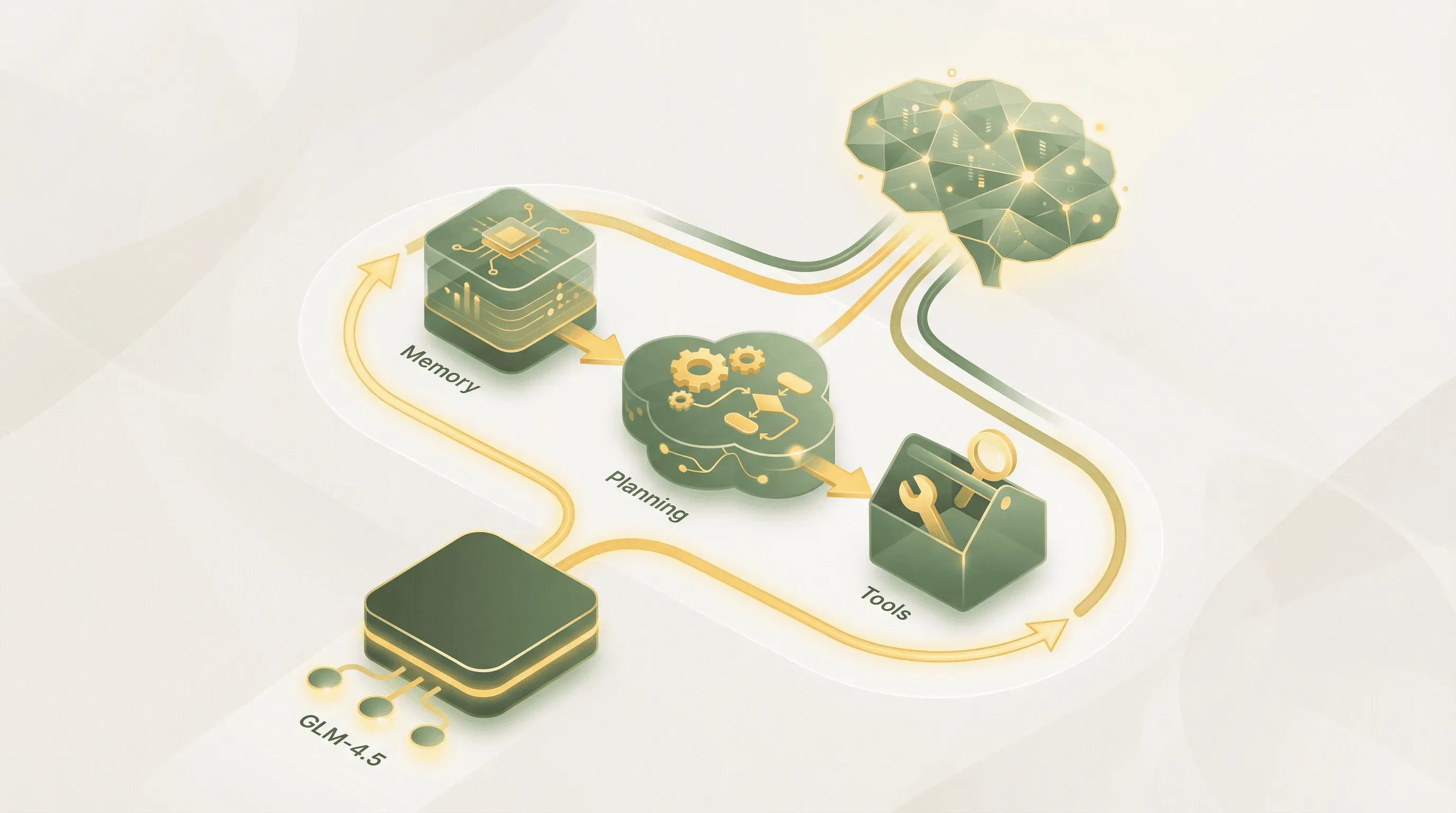 Building AI agents with GLM-5 and no-code platforms has never been more accessible
Introduction: Why GLM-5 Changes Everything for Agent Development
The era of simple chatbots is ending. According to McKinsey's State of AI 2025 report, 62% of organizations are now experimenting with AI agents—autonomous systems that can reason, plan, and take actions to accomplish goals. Unlike traditional chatbots that respond to prompts passively, AI agents proactively break down complex tasks, use external tools, and maintain memory across interactions.
GLM-5's release on February 11, 2026, marks a pivotal moment in this evolution. Before its official announcement, a mysterious model codenamed "Pony Alpha" appeared on OpenRouter and quickly topped the popularity charts with its exceptional coding ability and 200K context window. When the identity was revealed, Zhipu AI's stock surged 26% in a single day, with weekly gains reaching approximately 70%—a clear signal that the market recognizes GLM-5's transformative potential.
For non-technical founders, aspiring developers, and tech-curious professionals, this guide bridges the gap between curiosity and implementation. We'll explore GLM-5's unique capabilities for agent development while showing how YouWare enables anyone to build AI-powered applications through natural language—no coding required.
What is GLM-5: The Model Built for Agentic Engineering
 Zhipu AI's AutoGLM demonstrates how GLM models power autonomous agent applications — Source: Zhipu AI
GLM-5 is the new flagship model from Zhipu AI (智谱 AI), a Beijing-based AI company that became one of China's most valuable AI startups following its January 2025 Hong Kong IPO. Released on February 11, 2026, GLM-5 represents a fundamental shift in model design philosophy—targeting Agentic Engineering rather than simple code generation.
Technical Specifications
According to GLM-5's official HuggingFace documentation, the model delivers substantial improvements over its predecessor:
| Specification | GLM-5 | GLM-4.5 (Previous) |
|---|---|---|
| Total Parameters | 744B | 355B |
| Active Parameters (MoE) | 40B | 32B |
| Pre-training Data | 28.5T tokens | 23T tokens |
| Context Window | 200K tokens | 128K tokens |
| Maximum Output | 128K tokens | 32K tokens |
| License | MIT (Open Source) | MIT |
The Mixture-of-Experts (MoE) architecture means that while GLM-5 contains 744 billion parameters, only about 40 billion activate during each inference—delivering powerful capabilities while maintaining computational efficiency with a sparsity rate under 5.9%.
Three Technical Breakthroughs
1. Slime: Asynchronous Reinforcement Learning Framework
GLM-5 is powered by Slime, Zhipu AI's novel asynchronous RL infrastructure that substantially improves training throughput and efficiency. Traditional RL training for large language models faces severe efficiency bottlenecks. Slime solves this by enabling more fine-grained post-training iterations, allowing the model to continuously learn from long-horizon interactions—essential for developing robust agent capabilities.
2. DeepSeek Sparse Attention (DSA)
GLM-5 integrates DeepSeek's sparse attention mechanism, which significantly reduces deployment costs while preserving long-context capacity. This makes the 200K context window practical for real-world applications rather than just a specification on paper.
3. Thinking Mode
GLM-5 supports a dedicated thinking mode that can be enabled via API with "thinking": {"type": "enabled"}. This allows the model to engage in deeper reasoning for complex tasks while maintaining fast responses for simpler queries.
GLM-5's Benchmark Performance: Why It Excels at Agent Tasks
What truly sets GLM-5 apart for agent development is its exceptional performance on agentic benchmarks. According to official benchmarks, GLM-5 achieves open-source state-of-the-art (SOTA) results across reasoning, coding, and agent tasks.
Coding Performance
| Benchmark | GLM-5 | Claude Opus 4.5 | Gemini 3.0 Pro | GPT-5.2 |
|---|---|---|---|---|
| SWE-bench Verified | 77.8 | 80.9 | 76.2 | 80.0 |
| SWE-bench Multilingual | 73.3 | 77.5 | 65.0 | 72.0 |
| Terminal-Bench 2.0 | 56.2 | 59.3 | 54.2 | 54.0 |
| CyberGym | 43.2 | 50.6 | 39.9 | - |
GLM-5's 77.8% on SWE-bench Verified represents the highest score among open-source models, surpassing Gemini 3.0 Pro and approaching Claude Opus 4.5 levels.
Agent Capabilities
| Benchmark | GLM-5 | Claude Opus 4.5 | Gemini 3.0 Pro | GPT-5.2 |
|---|---|---|---|---|
| BrowseComp (Web Retrieval) | 62.0 | 37.0 | 37.8 | - |
| BrowseComp w/ Context | 75.9 | 67.8 | 59.2 | 65.8 |
| τ²-Bench (Multi-Tool) | 89.7 | 91.6 | 90.7 | 85.5 |
| MCP-Atlas (Tool Calling) | 67.8 | 65.2 | 66.6 | 68.0 |
| Vending Bench 2 | $4,432 | $4,967 | $5,478 | $3,591 |
The BrowseComp score of 62.0% dramatically outperforms all competitors—including closed-source models—demonstrating GLM-5's exceptional ability to retrieve and synthesize information from the web. The τ²-Bench and MCP-Atlas results confirm GLM-5's reliability for multi-tool agent scenarios.
Vending Bench 2 is particularly interesting: it requires the model to simulate running a vending machine business for one year. GLM-5's final account balance of $4,432.12 ranks first among open-source models and approaches Claude Opus 4.5's performance.
Reasoning Abilities
GLM-5 also excels at mathematical reasoning with 92.7% on AIME 2026 I, 96.9% on HMMT November 2025, and 50.4% on Humanity's Last Exam with Tools—all representing open-source best-in-class performance.
Understanding AI Agents: The Building Blocks
Before writing any code, understanding what makes an AI agent different from a simple chatbot is crucial. An AI agent is an autonomous system that perceives its environment, makes decisions, and takes actions to achieve specific goals.
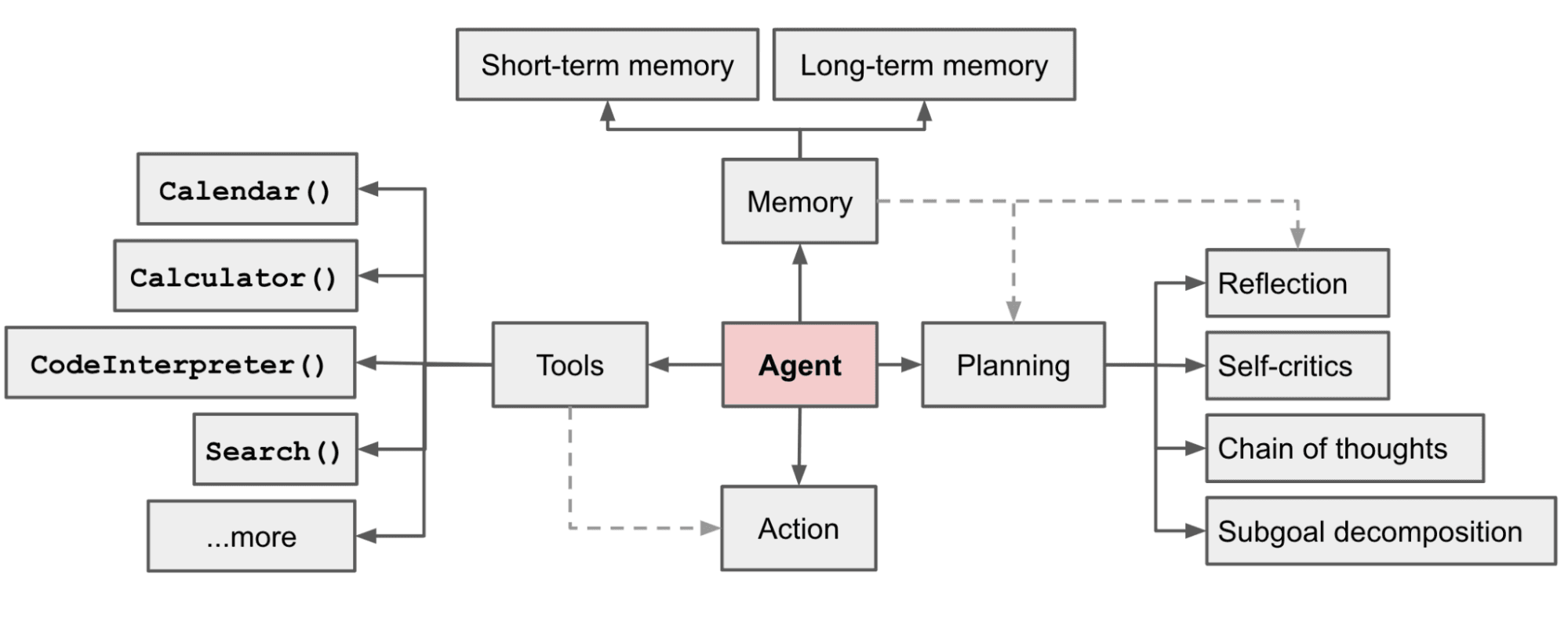 The core components of an LLM-powered autonomous agent include planning, memory, and tool integration — Source: Lil'Log - Lilian Weng
According to Skywork AI's comprehensive guide, modern AI agents consist of four essential components:
The Planning Module
The planning component enables agents to break down complex tasks into manageable steps. When you ask an agent to "research competitors and create a summary report," the planner decomposes this into subtasks: identify competitors, gather information about each, analyze findings, and format the report.
GLM-5's Thinking Mode excels at this planning capability. The model can generate detailed task decompositions before executing any actions, reducing errors and improving outcomes for complex workflows.
The Memory System
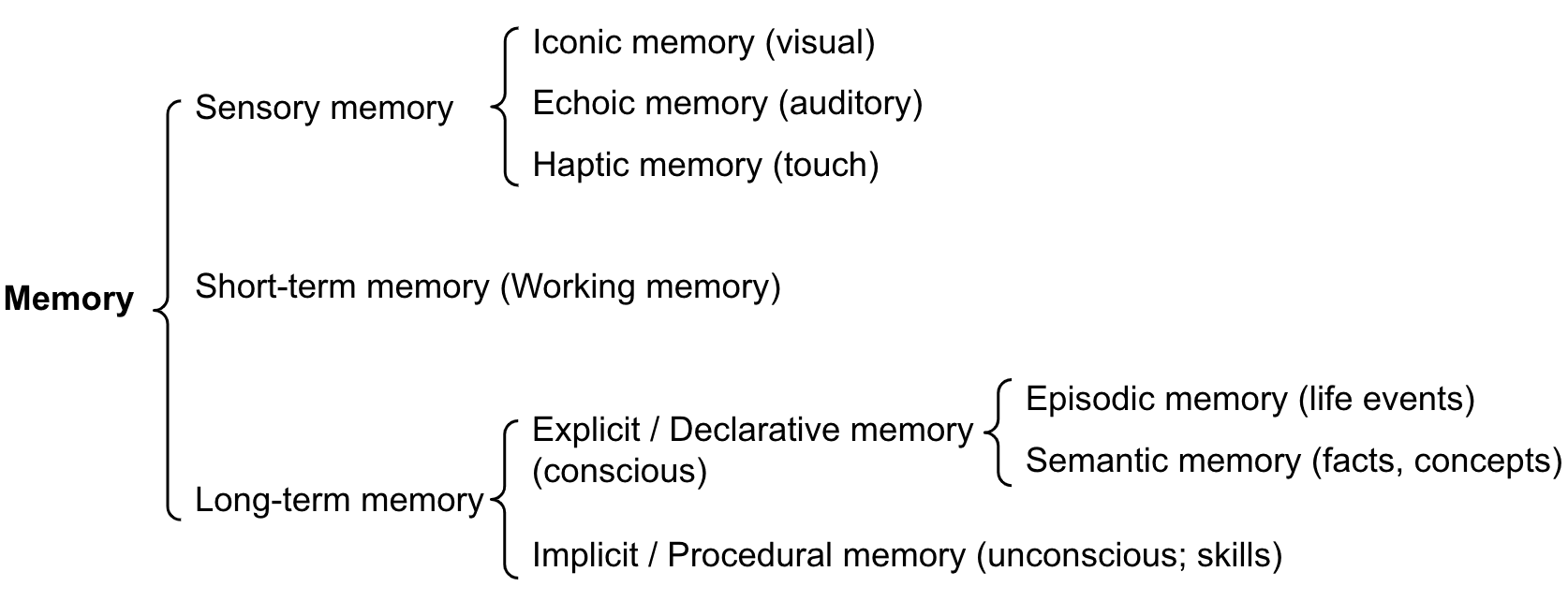 AI agent memory architecture mirrors human cognitive systems with short-term and long-term components — Source: Lil'Log - Lilian Weng
Memory allows agents to retain information across interactions. Sophisticated agent memory systems include multiple components. Short-term memory holds information relevant to the current task, such as intermediate results and context from the ongoing conversation. Long-term memory stores persistent knowledge, user preferences, and learned patterns that persist across sessions. Episodic memory records specific past interactions and their outcomes, enabling the agent to learn from experience. Semantic memory contains general knowledge and facts that inform the agent's understanding of the world.
GLM-5's massive 200K context window provides substantial working memory for complex tasks—far exceeding the typical 128K of previous generation models.
Tool Integration
Tools extend an agent's capabilities beyond text generation. Through tool-calling (also called function calling), agents can search the web, execute code, query databases, send emails, and interact with virtually any API. GLM-5's 67.8% on MCP-Atlas and 89.7% on τ²-Bench demonstrate its exceptional reliability for this critical function.
The Execution Loop
The execution loop orchestrates how agents perceive, decide, and act. The most common pattern is the ReAct framework, which we'll explore in depth next.
The ReAct Framework: How AI Agents Think and Act
ReAct (Reasoning and Acting) is the foundational framework that powers most modern AI agents. According to Salesforce's Agentforce documentation, ReAct integrates explicit reasoning with external actions through a structured cycle.
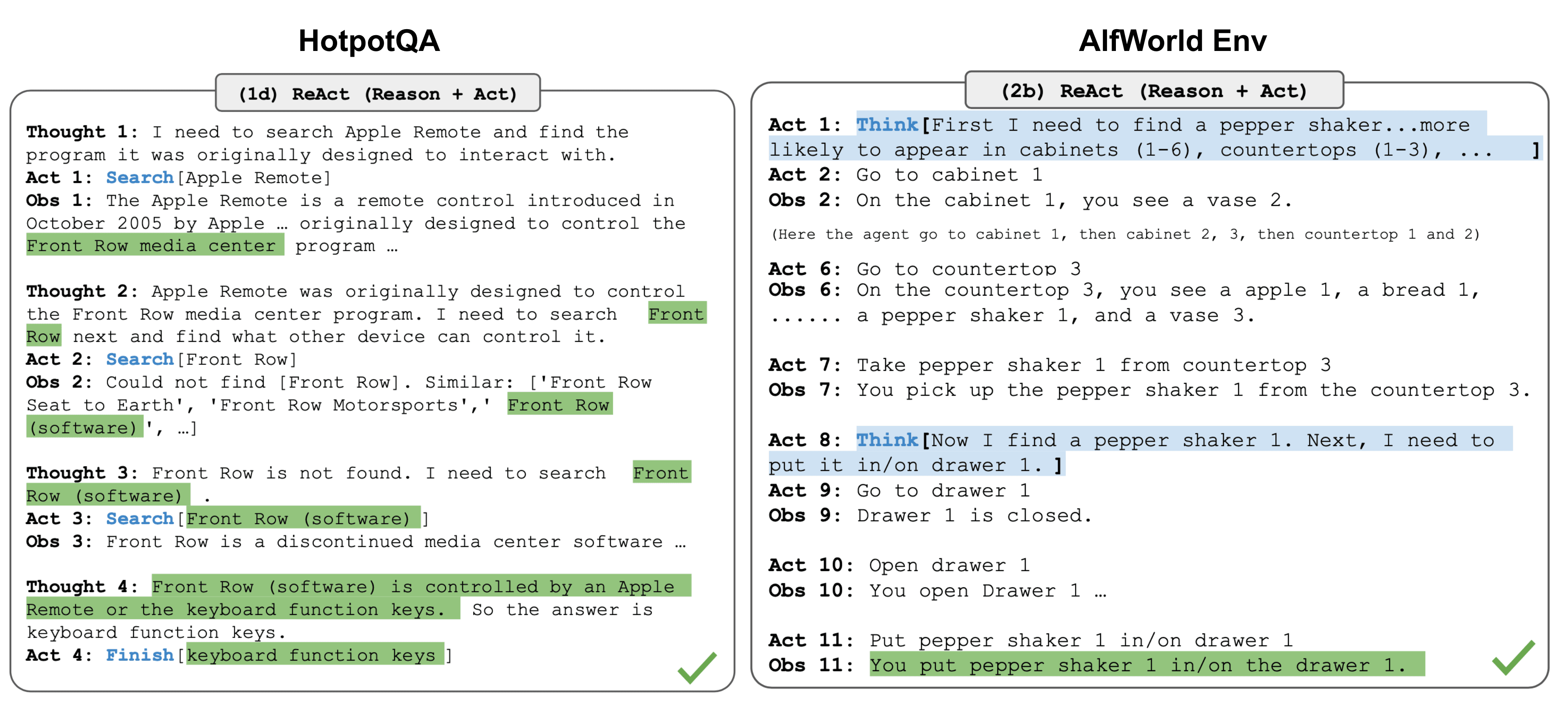 The ReAct framework enables agents to interleave reasoning with external actions — Source: Lil'Log - Lilian Weng
The ReAct pattern follows three repeating steps:
Thought: The agent reasons about the current situation, what information it needs, and what action to take next. This reasoning is explicit—you can see exactly why the agent makes each decision.
Action: Based on its reasoning, the agent executes a specific action, typically calling a tool or function. This might be searching the web, querying a database, or making an API call.
Observation: The agent receives and processes the result of its action. This observation informs the next thought, creating a continuous loop until the task is complete.
Here's a simplified example of ReAct in action:
User: What's the weather in Tokyo and should I bring an umbrella?

Thought: I need to find current weather information for Tokyo.
         I should use a weather API to get accurate data.

Action: call_weather_api(location="Tokyo")

Observation: Temperature: 18°C, Conditions: Light rain,
             Precipitation chance: 85%

Thought: The weather shows light rain with 85% precipitation chance.
         I should recommend bringing an umbrella.

Action: respond_to_user()

Response: It's currently 18°C in Tokyo with light rain and an 85%
          chance of precipitation. Yes, definitely bring an umbrella!
GLM-5's Thinking Mode naturally supports this pattern, generating detailed reasoning before each action.
Setting Up Your Development Environment for GLM-5
Before building your first agent, you need a properly configured development environment. This section walks through the essential setup steps.
 VS Code provides an ideal development environment for Python-based AI agent projects — Source: Visual Studio Code
Prerequisites
To follow this tutorial, you'll need Python 3.9 or higher installed on your system, a code editor (VS Code recommended), and a Zhipu AI API key from bigmodel.cn or api.z.ai.
Step 1: Create Your Project
Open your terminal and create a new project directory:
mkdir my-first-glm5-agent
cd my-first-glm5-agent
python -m venv venv
source venv/bin/activate  # On Windows: venv\Scripts\activate
Step 2: Install Required Packages
Install the essential libraries for agent development:
pip install zhipuai langchain langchain-community python-dotenv
The zhipuai package provides direct access to GLM-5's API. LangChain, which has been downloaded 47 million times on PyPI and experienced a 300% increase in downloads from Q1 2024 to Q1 2025 according to Fireworks AI, offers powerful abstractions for building agents.
Step 3: Configure Your API Key
Create a .env file in your project root:
ZHIPUAI_API_KEY=your_api_key_here
Never commit API keys to version control. Add .env to your .gitignore file.
Step 4: Verify Your Setup
Create a test_setup.py file:
from dotenv import load_dotenv
import os
from zhipuai import ZhipuAI

load_dotenv()

client = ZhipuAI(api_key=os.getenv("ZHIPUAI_API_KEY"))

response = client.chat.completions.create(
    model="glm-5",
    messages=[
        {"role": "user", "content": "Hello! Confirm you're GLM-5."}
    ]
)

print(response.choices[0].message.content)
Run python test_setup.py. If you see a response from GLM-5, your environment is ready.
Building Your First AI Agent: A Step-by-Step Tutorial
Now comes the exciting part—building an actual AI agent. We'll create a research assistant that can search the web and summarize findings.
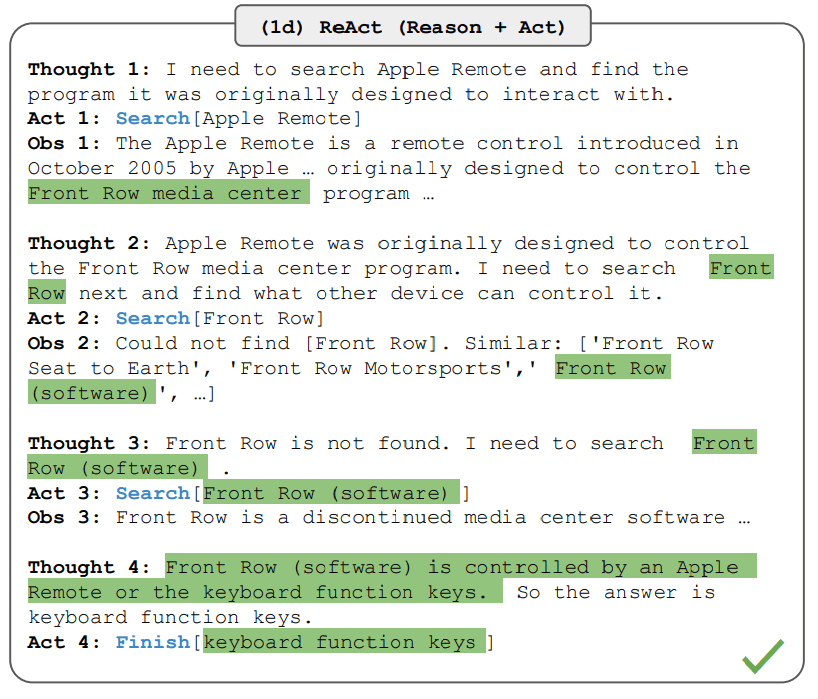 The ReAct prompting pattern structures agent reasoning through thought-action-observation cycles — Source: Prompting Guide
Step 1: Define Your Agent's Purpose
Every agent needs a clear purpose. Our research assistant will accept a topic, search for relevant information, analyze the findings, and provide a structured summary.
Step 2: Create the Tool Functions
import requests
from typing import List, Dict

def web_search(query: str) -> List[Dict]:
    """
    Search the web for information.
    In production, use a real search API like SerpAPI or Tavily.
    """
    # Simplified example - replace with actual API call
    return [
        {"title": "Result 1", "snippet": "Information about " + query},
        {"title": "Result 2", "snippet": "More details on " + query}
    ]

def summarize_results(results: List[Dict]) -> str:
    """Combine search results into a summary."""
    summaries = [r["snippet"] for r in results]
    return " | ".join(summaries)
Step 3: Implement the ReAct Loop with GLM-5
from zhipuai import ZhipuAI
import json
import os
from dotenv import load_dotenv

load_dotenv()
client = ZhipuAI(api_key=os.getenv("ZHIPUAI_API_KEY"))

tools = [
    {
        "type": "function",
        "function": {
            "name": "web_search",
            "description": "Search the web for information on a topic",
            "parameters": {
                "type": "object",
                "properties": {
                    "query": {
                        "type": "string",
                        "description": "The search query"
                    }
                },
                "required": ["query"]
            }
        }
    }
]

def run_agent(user_query: str):
    messages = [
        {
            "role": "system",
            "content": """You are a research assistant powered by GLM-5.
            When given a topic:
            1. Think about what information you need
            2. Use the web_search tool to find relevant data
            3. Analyze the results
            4. Provide a comprehensive summary"""
        },
        {"role": "user", "content": user_query}
    ]

    while True:
        response = client.chat.completions.create(
            model="glm-5",
            messages=messages,
            tools=tools,
            tool_choice="auto"
        )

        assistant_message = response.choices[0].message
        messages.append(assistant_message)

        if assistant_message.tool_calls:
            for tool_call in assistant_message.tool_calls:
                if tool_call.function.name == "web_search":
                    args = json.loads(tool_call.function.arguments)
                    results = web_search(args["query"])

                    messages.append({
                        "role": "tool",
                        "tool_call_id": tool_call.id,
                        "content": json.dumps(results)
                    })
        else:
            return assistant_message.content

# Run the agent
result = run_agent("What are the latest trends in AI agents?")
print(result)
Step 4: Enable Thinking Mode for Complex Tasks
For tasks requiring deeper reasoning, enable GLM-5's thinking mode:
response = client.chat.completions.create(
    model="glm-5",
    messages=messages,
    tools=tools,
    tool_choice="auto",
    thinking={"type": "enabled"}  # Enable thinking mode
)
Step 5: Test and Iterate
Run your agent with various queries. Observe how it reasons through problems and uses tools. Adjust the system prompt to improve behavior.
GLM-5 Pricing: Enterprise Power at Startup Prices
One of GLM-5's most compelling advantages is its pricing. According to official pricing information, GLM-5 offers exceptional value:
| Version | Input | Output | Cached Input |
|---|---|---|---|
| International | $1 / million tokens | $3.2 / million tokens | $0.2 / million tokens |
| China (≤32K) | ¥4 / million tokens | ¥18 / million tokens | ¥1 / million tokens |
| China (>32K) | ¥8 / million tokens | ¥32 / million tokens | - |
| Batch API | ¥2.5 / million tokens | - | - |
Compared to Claude Opus 4.5's pricing ($15/$75 per million tokens), GLM-5 is approximately 15-23x cheaper. This dramatic cost difference makes it practical for developers to experiment, iterate, and deploy agents at scale.
Local Deployment Options
For organizations requiring on-premises deployment, GLM-5 offers multiple options:
Hardware Requirements: The FP8 version requires at least 8× H200 GPUs or equivalent. GLM-5 is available in BF16, FP8, and INT4 precision versions, with INT4 enabling deployment on smaller GPU clusters.
Inference Frameworks: GLM-5 supports vLLM and SGLang for high-throughput inference, with typical latency of 1-2 seconds for first token and sustained throughput of 30-60 tokens/second.
Chinese Chip Compatibility: GLM-5 launched with Day 0 support for seven domestic Chinese chip platforms including Huawei Ascend, Moore Threads, Cambricon, Kunlun, Muxin, Enflame, and Hygon—all with optimized operators for high-throughput, low-latency operation.
Common Mistakes Beginners Make (And How to Avoid Them)
According to The Open Record's analysis of AI agent development, several pitfalls trap newcomers. Understanding these mistakes upfront saves hours of debugging.
Over-Engineering from the Start: Many beginners try building complex multi-agent systems before mastering single-agent basics. Start simple. Build a working agent with one or two tools, then gradually add complexity. Your first agent should solve a specific, narrow problem well rather than attempting to handle everypossible scenario.
Neglecting Edge Cases: Agents encounter unexpected inputs, API failures, and ambiguous requests. Always implement error handling for tool failures, add fallback behaviors when tools don't return expected results, and test with unusual inputs to discover edge cases early.
Failing to Establish Success Metrics: Without clear metrics, you can't know if your agent is improving. Define what success looks like before building. Measure task completion rate, response quality, and error frequency. Track these metrics over time to guide development.
Ignoring Token Costs: Each API call costs money. Verbose prompts and unnecessary reasoning steps add up quickly. GLM-5's competitive pricing helps, but optimize your prompts for clarity without excessive length, and consider implementing caching for repeated queries.
Skipping the Planning Phase: Jumping directly into coding without planning the agent's architecture leads to rewrites. Map out the agent's decision flow, tools needed, and memory requirements before writing code.
No-Code Alternative: Building AI-Powered Applications with YouWare
Not everyone wants to write code, and that's perfectly valid. YouWare provides a no-code platform that lets anyone build AI-powered applications through natural language prompts—experiencing many agent-like capabilities without programming.
YouWare empowers users to create complete web applications from concept to production through conversational AI. Simply describe your idea, and YouWare's AI generates a functional application including frontend interface, backend logic, database, and authentication.
How YouWare Mirrors Agent Concepts
YouWare's architecture naturally incorporates many principles from AI agent development. The platform's Plan Mode mirrors the planning component essential in agent architecture—it organizes complex projects into structured steps before execution, just like an agent's task decomposition module. When building with YouWare, you experience how AI systems break down complex goals into actionable subtasks.
The MCP Tools integration in YouWare demonstrates tool-calling in action. Users can connect their applications to external services like Figma for design conversion, Notion for content management, GitHub for version control, and Supabase for database functionality. This is precisely how agents extend their capabilities—by calling external tools to interact with the real world.
YouWare's YouBase provides the backend infrastructure beginners need without managing servers. The Database module stores structured data, the Users & Authentication module implements login functionality with email and Google OAuth, the Storage module handles file uploads, and the Secrets module securely stores API keys. These capabilities give you the building blocks for agent-enabled applications without infrastructure complexity.
Multi-Model Flexibility
YouWare offers multi-model switching, allowing users to choose between OpenAI O3 Pro, GPT-4o, Claude Sonnet 4.5, Gemini 2.5 Pro, and DeepSeek V3 based on task requirements. This flexibility lets you experiment with different AI capabilities for different aspects of your application.
From No-Code to Understanding
For beginners, YouWare offers an ideal learning path. Build functional AI-powered applications while developing intuition for how agents work. See how AI interprets your prompts, breaks down tasks, and uses tools—then apply that understanding when you're ready to code custom agents.
Ready to experience AI-powered development? Get started with YouWare today at youware.com.
Developer Ecosystem: Z Code and OpenClaw
To complement GLM-5's release, Zhipu AI introduced several developer tools:
Z Code: An intelligent agent development environment where users simply express their needs and the model automatically decomposes tasks. Multiple agents work concurrently to complete code writing, command execution, debugging, preview, and submission. Remarkably, users can even remotely direct desktop agents from their mobile phones—truly enabling "code anywhere."
OpenClaw Integration: GLM-5 seamlessly integrates with the OpenClaw framework, Zhipu's cross-application agent framework. The AutoGLM version supports one-click integration with Feishu bots, enabling GLM-5 to help search websites, schedule news summaries, publish tweets, and handle programming tasks.
Document Generation: GLM-5 can directly output structured documents including .docx, .pdf, and .xlsx files. On Z.ai and Zhipu Qingyan, users can have GLM-5 generate product requirement documents, lesson plans, exams, spreadsheets, and financial reports directly.
Real-World AI Agent Use Cases for Inspiration
Understanding practical applications helps contextualize what you're building. According to Salesforce's research, the number of AI agents deployed within organizations grew by 119% in the first half of 2025. Here's where they're making impact:
Customer Service Automation: Agents handle complex support tickets by understanding context, searching knowledge bases, and taking actions like processing refunds or scheduling appointments. Unlike simple chatbots, these agents maintain conversation context and escalate appropriately when needed.
Research and Analysis: Research agents gather information from multiple sources, synthesize findings, and produce structured reports. Legal, financial, and academic professionals use them to accelerate research workflows while maintaining quality.
Code Development Assistance: Developer agents help write, review, and debug code. They understand project context, follow coding standards, and integrate with development tools. GLM-5's 77.8% on SWE-bench Verified demonstrates its strong software engineering capabilities.
Complex Business Simulation: GLM-5's Vending Bench 2 performance ($4,432.12 final balance) shows its ability to handle complex, long-horizon business tasks requiring strategic planning over extended periods.
Personal Productivity: Individual agents manage calendars, draft communications, and automate repetitive tasks. They learn user preferences over time, becoming more helpful with each interaction.
Next Steps: From Beginner to Intermediate Agent Developer
You've learned the fundamentals of AI agents and built your first one with GLM-5. Here's your roadmap for continued growth:
Deepen Your Framework Knowledge: Explore LangChain's advanced features including chains, memory types, and agent executors. With 47 million downloads, extensive documentation and community resources exist to support your learning.
Experiment with Multiple Models: While GLM-5 excels at agentic tasks, different models have different strengths. Try building agents with Claude, GPT-4, and other open-source alternatives to understand the tradeoffs.
Build Increasingly Complex Agents: Progress from single-tool agents to multi-tool systems. Implement proper memory persistence. Create agents that collaborate with other agents.
Study Production Systems: Examine how companies deploy agents at scale. Learn about observability, testing strategies, and cost optimization for production environments.
Join the Community: The Cloudera survey found that 96% of enterprise IT leaders plan to expand AI agent usage. Join forums, attend meetups, and contribute to open-source projects to stay current with thisrapidly evolving field.
The agentic AI market's projected growth from $6.23 billion in 2025 to $107.28 billion by 2032 signals massive opportunity for those who develop these skills now.
FAQ
What's the difference between GLM-5 and GLM-4.5?
GLM-5 represents a major generational leap over GLM-4.5. Key differences include: parameter scale expanding from 355B to 744B total (32B to 40B active), pre-training data increasing from 23T to 28.5T tokens, context window expanding from 128K to 200K tokens, and maximum output growing from 32K to 128K tokens. GLM-5 also integrates DeepSeek Sparse Attention (DSA) for more efficient long-context processing and is purpose-built for Agentic Engineering rather than general-purpose tasks.
Do I need to know how to code to build AI agents?
Traditional agent development requires programming knowledge, but no-code alternatives exist. YouWare enables anyone to build AI-powered applications through natural language prompts, experiencing many agent-like capabilities without coding. This provides an excellent starting point for understanding agent concepts before diving into code.
How much does it cost to run AI agents with GLM-5?
GLM-5 offers exceptional value at approximately $1/million input tokens and $3.2/million output tokens internationally—roughly 15-23x cheaper than Claude Opus 4.5. For high-volume applications, the Batch API offers ¥2.5/million tokens. GLM-5 is also open-source under MIT License, so organizations can self-host to eliminate API costs entirely (requires 8× H200 GPUs or equivalent for FP8 deployment).
Why does GLM-5 excel at agent development compared to other models?
GLM-5 was specifically designed for Agentic Engineering. Its benchmark results prove this focus: 62.0% on BrowseComp (dramatically outperforming competitors including closed-source models), 89.7% on τ²-Bench for multi-tool scenarios, and 67.8% on MCP-Atlas for tool calling. The model's 200K context window, Slime asynchronous RL training, and dedicated thinking mode all contribute to superior agent performance.
What's the best way to learn agent development as a complete beginner?
Start with concepts before code. Understand the ReAct framework and core components (planning, memory, tools). Build simple agents with one or two tools using GLM-5's excellent documentation. Consider using YouWare to experience agent-like capabilities visually before coding. Join communities, study examples, and iterate on your own projects.
Conclusion
GLM-5 represents more than just another model upgrade—it's a paradigm shift from "writing code" to "writing engineering systems." With its purpose-built Agentic Engineering capabilities, exceptional benchmark performance, open-source availability, and pricing that's 15-23x cheaper than leading closed-source alternatives, GLM-5 democratizes AI agent development for everyone.
Whether you choose the coding path with GLM-5 or the no-code approach with YouWare, the key is starting now. With 84% of enterprise leaders planning to increase AI agent investments, understanding this technology positions you at the forefront of the next computing paradigm.
Ready to build without writing code? Get started with YouWare today and experience AI-powered development firsthand.
References
- GLM-5 Official HuggingFace Page
- Slime: Asynchronous RL Framework
- GLM-5 Launch Article - 53AI
- Zhipu AI BigModel Pricing
- Salesforce - ReAct Agents Explained
- McKinsey - The State of AI 2025
- Cloudera Enterprise AI Agent Adoption Survey
- SNS Insider - Agentic AI Market Report
- Skywork AI - AI Agents Explained
- Zapier Survey on Enterprise AI Agent Investment
- Arsum - AI Agent Frameworks Comparison
- Wikipedia - Zhipu AI
- Lil'Log - LLM Powered Autonomous Agents
- Prompting Guide - ReAct Framework